Key takeaways
- Count usable mounting holes and measure deck thickness.
- Check handle sweep and sensor field against backsplash and accessories.
- Measure spout reach to the primary bowl zone.
- Identify 3/8-inch compression or other exact supply requirements.
- Reserve the manual’s control-box and battery-holder envelope.
- Plot pull-down hose and weight travel at full extension.
- Keep disposal, trap, filter, drawer, cables, and stored goods outside that path.
- Verify receptacle switching and approved adapter location when AC is used.
A touchless kitchen faucet is a small electromechanical water-control system. The spout or base detects a hand, a controller interprets that signal, a powered solenoid opens the water path, and the mechanical handle sets temperature or provides fallback control. Reliability therefore depends on more than the visible sensor.
Affiliate disclosure: Links to referenced faucet models may generate a commission after a qualifying purchase. Technical selection and troubleshooting criteria remain based on manufacturer documentation.
Our top picks


As an Amazon Associate we earn from qualifying purchases at no extra cost to you.
Research method: No faucet was installed or endurance-tested for this guide. Current Delta Touch2O with Touchless, Moen MotionSense Wave, and KOHLER Sensate documentation was reviewed on August 26, 2026. These systems illustrate different sensing and power implementations; they are engineering examples, not a ranked buying list.
Three Documented Architectures
| Exact example | Activation and power documented by manufacturer | Fallback question |
|---|---|---|
| Delta Monrovia 9191TL-PR-DST | Touchless proximity, Touch2O touch, or handle; included battery operation with optional approved AC adapter | Can the user deliberately choose handle, touch, or proximity behavior during a fault? |
| Moen Arbor 7594E | MotionSense Wave hand-wave sensor; battery pack with optional AC power accessories for supported configuration | How does handle position set temperature when the wave sensor starts flow? |
| KOHLER Sensate K-72218 | Response touchless sensing with an AC-powered control system documented for the model | What manual operation is available during power or component interruption? |
Model suffixes can change finish, power kit, flow, included accessories, or technology generation. Read the complete installation and homeowner guide for the exact unit. A collection page may describe features added after an older faucet bearing the same collection name was manufactured.
Sensor Type and Placement Determine Behavior
Infrared systems emit and detect reflected light within a designed zone. Capacitive systems detect a change in an electric field near or through the faucet body. Wave sensors define a deliberate pass-by location. Delta documents a capacitive sensing field around supported Touch2O with Touchless faucets, while Moen’s MotionSense Wave positions activation for a hand gesture.
Placement changes false-trigger risk. A forward-facing field near a drying rack may see dishes or wiping motions. A side or top sensor can become obstructed by a large pot. Reflective surfaces, direct sunlight, conductive sink materials, nearby wiring, and grounding or isolation details may affect specific designs, so follow the manual’s installation geometry rather than relocating components experimentally.
Accessibility is personal. Proximity activation can help a user with limited grip, but the sensing zone still must be reachable and predictable. Manual controls should have a usable force and range. Test the proposed activation motion at full-size faucet height before purchase, including seated reach where relevant.
Battery, AC, and Hybrid Power Choices
Battery power avoids dependence on a cabinet receptacle and can continue during a household outage while batteries remain healthy. It introduces replacement intervals, holder placement, leakage risk, and performance decline. Install the holder above the cabinet floor where directed and keep it accessible without crossing moving hoses.
AC power removes routine battery replacement but requires the exact isolated adapter, compatible controller, and a suitable receptacle. A disposal outlet may be switched, leaving the faucet unpowered whenever the wall switch is off. Electrical work near plumbing must comply with applicable rules and product instructions.
Some supported models accept an AC adapter while retaining or optionally using battery backup; others specify one power architecture. “Hybrid” should never be improvised by connecting two supplies that the controller was not designed to accept. Confirm outage behavior in the exact manual: manual handle control, valve position, and restoration procedure differ across systems.
Controller, Solenoid, and Water Path
The handle mechanically establishes temperature and sometimes flow limits, while the solenoid starts or stops the prepared mixed stream. A control box receives sensor input and power, then actuates the valve. Quick-connects, inlet screens, cables, and isolation pieces are model-specific parts of that architecture.
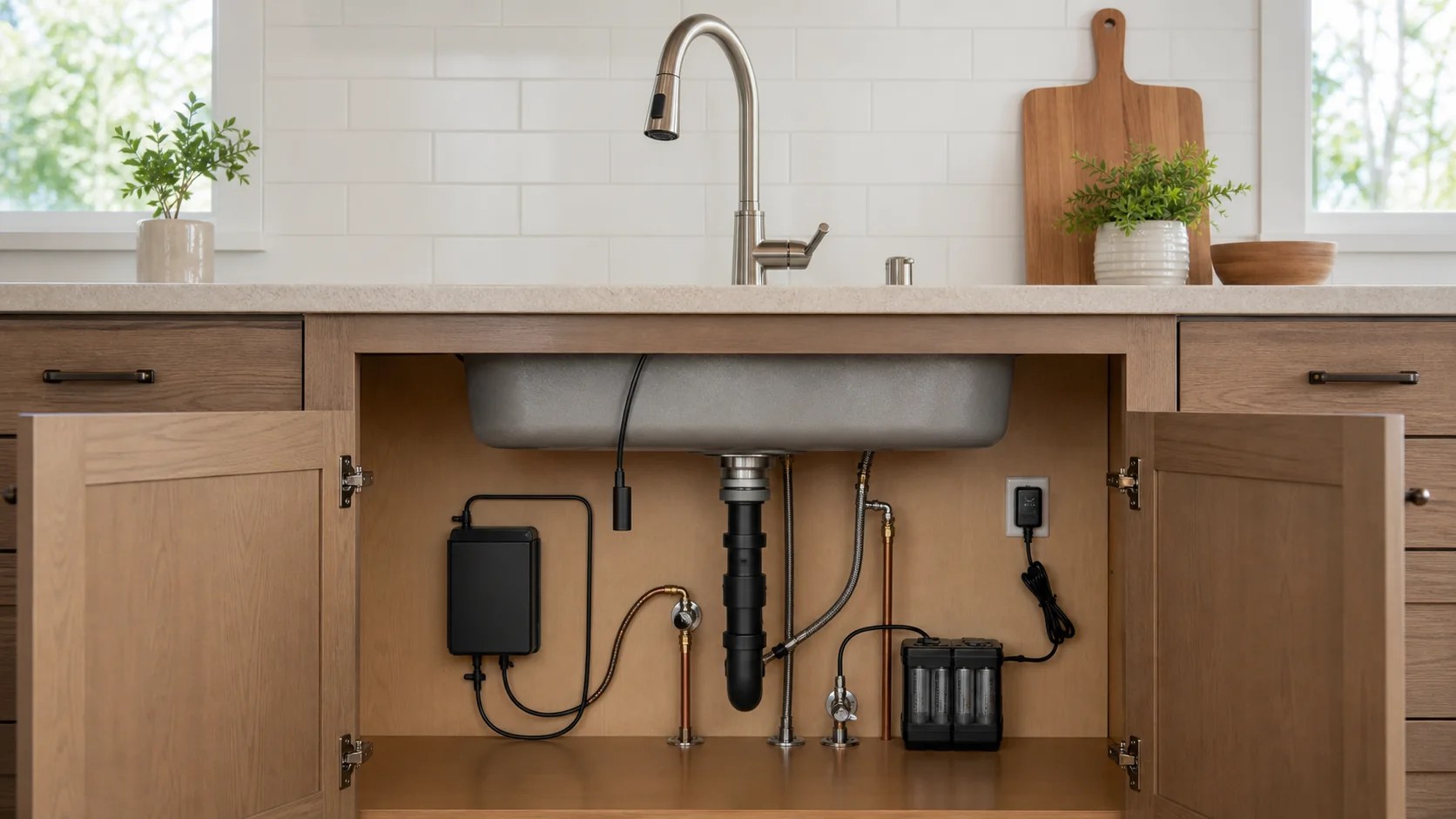
Cabinet layout matters because the controller and solenoid carry water or sit beside water connections. Mount them in the specified orientation. Do not leave electronics on the cabinet floor, suspend a water-bearing box from cables, or hide it behind a permanent shelf. A replacement module must remain identifiable and removable.
A sudden no-flow symptom can originate from a closed handle, dead battery, disconnected cable, blocked screen, closed stop, kinked hose, solenoid state, or upstream supply. Troubleshoot the chain from simple observable conditions to model diagnostics rather than replacing the sensor first.
Compatibility Measurements Below the Sink
- Count usable mounting holes and measure deck thickness.
- Check handle sweep and sensor field against backsplash and accessories.
- Measure spout reach to the primary bowl zone.
- Identify 3/8-inch compression or other exact supply requirements.
- Reserve the manual’s control-box and battery-holder envelope.
- Plot pull-down hose and weight travel at full extension.
- Keep disposal, trap, filter, drawer, cables, and stored goods outside that path.
- Verify receptacle switching and approved adapter location when AC is used.
Take a cabinet photograph and draw front and side elevations. A component that fits against the back wall can still collide when the pull-down weight rises. Maintain bend radius and strain relief for cables and tubing. Never pinch a wire behind a mounting rail or route it against a hot-water line unless the manual permits the arrangement.
Installation, Startup, and Calibration
Install the mechanical faucet, supplies, spray hose, and mounting hardware before connecting power in the sequence shown. Confirm hot and cold orientation, flush debris when instructed, then connect the solenoid and controller using keyed ports. Forced connectors can damage pins or seals.
MotionSense and other systems can run a startup sequence after batteries or AC are connected. Keep the sink clear and follow indicator lights or timed steps. Delta provides sensitivity modes for supported Touch2O with Touchless products; select the manual’s recommended setting for the sink and countertop rather than treating sensitivity as a maximum-performance control.
Test every supported method: proximity, touch, handle, manual override, temperature selection, pull-down extension, and automatic shutoff behavior. Simulate a power interruption using only the documented procedure. Record the result so household members know how to obtain or stop water during a fault.
False Trigger and No-Response Diagnosis
| Symptom | Controlled checks | Do not do |
|---|---|---|
| Activates while cleaning | Use cleaning lockout or disable method; clear sensing field | Spray cleaner into sensor seams |
| Starts near metal objects | Review isolation, cable routing, sensitivity, and sink-material guidance | Remove specified isolation parts |
| No sensor response | Check handle state, indicator, batteries or AC, cable seating, and stops | Open a sealed control box |
| Clicks but no water flows | Inspect supply, inlet screen, hose kink, and solenoid connection | Defeat valve or flow components |
| Runs unexpectedly after power restore | Follow startup and reset instructions | Leave the sink unattended during diagnostics |
Change one variable at a time and document indicator codes. Repeatedly unplugging cables, mixing battery types, or cycling water stops can create new symptoms. Shut the fixture stops for wet electronics, a leaking solenoid, damaged tubing, or uncontrolled flow.
Maintenance and Replacement-Part Planning
Clean sensing surfaces with the finish-approved method. Replace batteries as a complete matched set of the specified type, inspect contacts, and dispose of cells correctly. Keep the control area dry, yet do not wrap a module so tightly that it traps leakage or blocks service indicators.
Inspect the spray hose, quick-connects, solenoid body, supply joints, and cabinet floor quarterly. Operate manual control regularly so its condition remains known. Clean aerators and inlet screens only through the model procedure; debris at a screen can imitate electrical failure.
Before purchase, locate part numbers for battery holder, AC adapter, solenoid or control module, sensor cable, spray hose, cartridge, and isolation components. Check whether manufacturer support can diagnose by serial number or generation. A fashionable faucet without a traceable control module can become mechanical replacement work after one failed proprietary part.
Pre-Purchase Reliability Checklist
- Choose a sensing motion every intended user can repeat.
- Confirm manual water control during the documented outage state.
- Verify battery life assumptions or an unswitched approved AC source.
- Draw the complete cabinet routing before ordering.
- Review startup, sensitivity, lockout, and reset instructions.
- Find current replacement control, power, hose, and valve parts.
- Check warranty exclusions for installation, batteries, finish, and electronics.
- Preserve access to stops and modules after storage is returned.
Coordinate the next decision with the audit sink holes and install the faucet body.
Frequently Asked Questions
Will every touchless faucet work manually without power?
No. Fallback behavior is model-specific. Read the exact outage and manual-override instructions before choosing a power architecture.
Can a touchless faucet plug into a disposal outlet?
A switched receptacle may interrupt power. Use only the approved adapter and an electrical arrangement compliant with the faucet instructions and local requirements.
Why does the faucet activate when the spout is moved?
Possible causes include sensing mode, grasp duration, sensitivity, isolation, or installation routing. Follow model diagnostics rather than assuming the sensor is defective.
Are rechargeable batteries acceptable?
Use only battery types permitted by the manufacturer. Voltage and discharge behavior differ, and an unsupported cell can cause unreliable operation or damage.
When should manufacturer support be contacted?
Contact support for persistent fault codes, unavailable manual fallback, wet electronics, repeated false activation after correct setup, leaking control components, or uncertain generation-specific parts.
Reliability Is a System Property
Choose touchless control only after verifying sensing behavior, power continuity, manual fallback, cabinet routing, diagnostic clarity, and parts support. Delta Monrovia 9191TL, Moen Arbor 7594E, and KOHLER Sensate K-72218 demonstrate different implementations. The best fit is the system whose failure modes the household can recognize and safely manage.
Sources
- Delta Faucet official product page
- Delta Faucet specification or instruction document
- Moen specification or instruction document
- Moen official product page
- Kohler official product page